
Match the Right Battery to Your Opener Device
Identify the battery in a garage door remote, keypad, or backup system, then match the model, voltage, polarity, capacity, and connector safely.
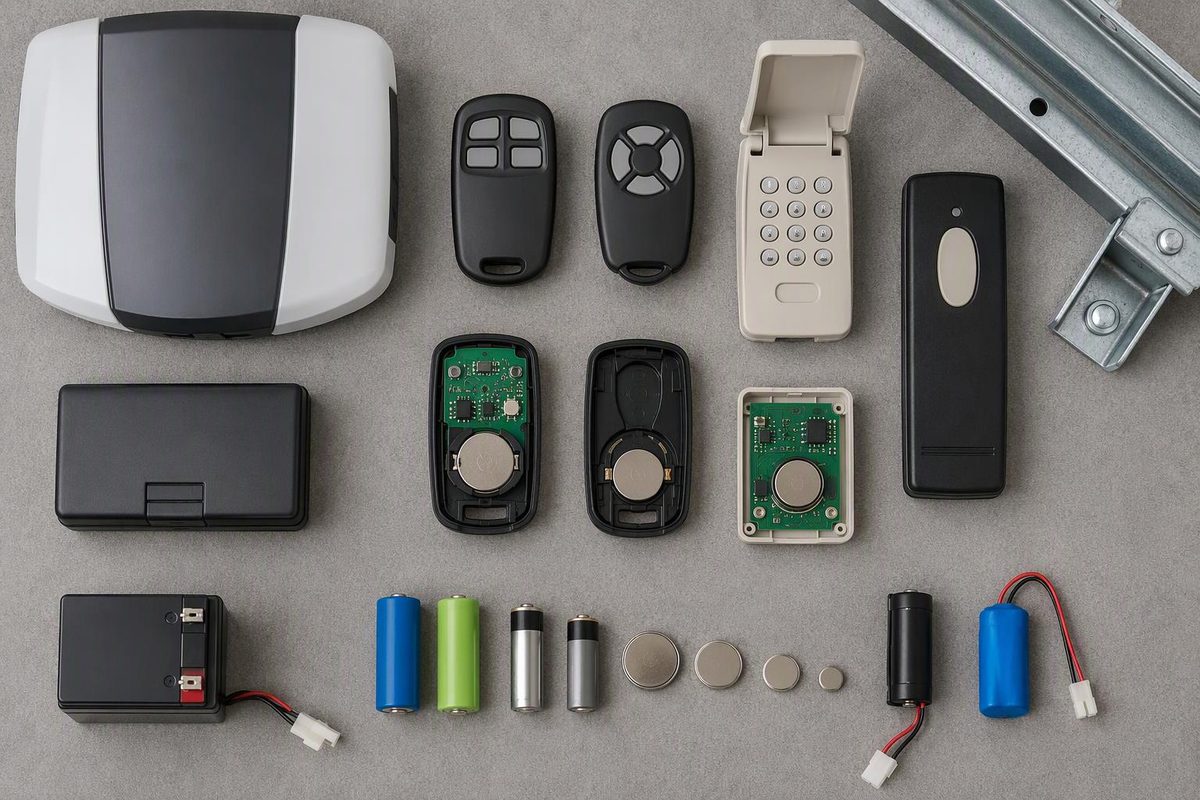
Use the battery specified for the exact device and model. A handheld remote commonly uses a CR2032 coin cell, though some use AAA or another type; many wireless keypads use a 9V alkaline battery; and an opener’s outage backup requires a model-specific rechargeable battery. These batteries are not interchangeable.
Choose the device that is not working; the matcher shows what to check before buying.
Garage-Door Opener Battery Matcher
Which device needs power?
Compare all three device types below. Confirm the model and compartment label before buying.
Remote
Commonly CR2032; some use AAA or another type
Verify: Remote model, voltage, quantity and polarity.
Compatibility caveat
Some Chamberlain Group remotes use one CR2032, some use two CR2032 cells and others use an AAA battery. Follow the label or manual for the exact remote.
Wireless Keypad
Commonly one 9V alkaline battery
Verify: Keypad model and battery-compartment label.
Compatibility caveat
A 9V alkaline battery is listed for several Chamberlain Group keypad families, but that does not establish the specification for every keypad.
Outage Backup
Model-specific rechargeable battery
Verify: Part number, voltage, capacity, chemistry, dimensions, connector and polarity.
Compatibility caveat
Examples differ: Genie 39524R uses one 12V, 5Ah sealed lead-acid replacement, while LiftMaster 041B0591 contains two 12V, 4.5Ah rechargeable batteries.
Source: Chamberlain Group, Genie and LiftMaster manufacturer instructions cited in the article.
Match the Device, Not Just the Opener Brand
The common battery patterns are not universal specifications. Chamberlain Group’s instructions specify one CR2032 for many remotes, two CR2032 cells for certain models and an AAA battery for others. Its listed wireless keypads generally take a 9V alkaline battery (remote battery instructions; keypad battery instructions).
Do not order from the opener’s brand name alone. Find the model label on the device that needs the battery:
- Remote: Inside the case, under the visor clip or on the back
- Keypad: On the back or inside the battery compartment
- Ceiling- or wall-mounted opener: On the motor unit, often behind a light cover or on a side panel
- Backup battery: On the battery or enclosure, if safely accessible
Use that model number with the manual or manufacturer’s parts lookup. Chamberlain Group, for example, provides manuals and parts searches by model number through its manuals and parts service.
Remote Batteries Are Often CR2032, but Not Always
A CR2032 is a 3-volt coin cell used in many garage-door remotes, but it is not universal. Genie’s instructions for several covered remote designs specify a CR2032 with the positive side facing up (Genie CR2032 instructions). Follow the polarity mark in your own remote rather than treating that orientation as a rule for every model.
To replace a remote battery:
- Record the remote model number.
- Open the case using the specified screw, notch or visor clip. Do not force the seam; check for a concealed screw first.
- Photograph the old battery’s orientation.
- Match the code printed on the old battery unless the manual identifies an approved replacement.
- Install the new battery without bending the contacts, close the case and test the remote from inside the garage.
A battery change by itself should not require erasing the opener’s memory. If the wall control operates the door but the remote still does not, check lock or vacation mode, battery polarity and contacts, range, compatibility and programming. Chamberlain’s remote troubleshooting sequence also notes that radio interference may make a remote work only at close range.
If the wall control also fails, follow the broader safe opener troubleshooting guide.
Keep loose coin cells and the open remote away from children. A swallowed coin lithium battery can lodge in the esophagus and cause severe injury rapidly; suspected ingestion requires immediate emergency care (coin-lithium battery safety). Do not recharge, disassemble, heat or burn a disposable coin cell.
Wireless Keypads Commonly Use a 9V Alkaline Battery
Many wireless exterior keypads use one 9V alkaline battery, but confirm the keypad model and battery-compartment label first. Chamberlain Group specifies a 9V alkaline battery for several keypad families, not necessarily every keypad sold under the brand.
Release or slide the cover as the manual directs, disconnect the old battery and attach the new one with the terminals aligned. Test the keypad before forcing a tight cover fully into place.
If fresh power does not restore operation, check compatibility, lock mode and programming instead of assuming the new battery is defective. The keyless-entry matching and troubleshooting guide covers that sequence.
Backup Batteries Must Match the Opener System
A backup battery powers the opener motor during an outage; it does not power only the remote. Treat it as a model-specific replacement part.
Do not match a backup battery by voltage alone. Verify all of the following:
- Manufacturer part number or approved successor
- Nominal voltage and amp-hour capacity
- Battery chemistry
- Number of batteries in the system
- Case dimensions and terminal layout
- Connector and polarity
- Explicit compatibility with the opener model
The differences are consequential. Genie’s instructions for its 39524R backup assembly require one 12V, 5Ah sealed lead-acid replacement battery (Genie 39524R instructions). LiftMaster’s 041B0591 kit instead contains two 12V, 4.5Ah rechargeable batteries and is limited to listed opener families (LiftMaster 041B0591 specifications).
Discontinued numbers may have official successors. Chamberlain directs batteries marked 132B2511, 132B2511-1, 132B2511-2 or 132B2511-3 to its 4228 replacement (Chamberlain replacement notice). Confirm that succession through the manufacturer rather than assuming that a similarly sized battery is equivalent.
Replace a Backup Battery Safely
Use the exact procedure for the opener and battery assembly. The safe framework is:
- Close the door if it operates normally. Do not run a crooked, off-track, binding or unexpectedly heavy door merely to close it. Isolate the opener and have the door system inspected instead.
- Disconnect AC power and battery power in the order specified by the manual.
- Use a stable ladder and open only the battery compartment or external backup module identified in the instructions.
- Photograph the connections before removal, then follow the prescribed disconnection and reconnection order.
- Secure the correct replacement battery, restore power and allow the stated charging time.
- Test backup operation using the manual’s procedure.
For the 39524R assembly, Genie requires the door to be closed, all electrical and battery power to be disconnected before service, correct polarity and eye protection. It specifies 24–48 hours of charging before testing.
Stop if the battery is swollen, cracked, leaking, unusually hot, corroded into its compartment or surrounded by damaged wiring. Do not substitute a battery simply because it fits.
A successful test shows that the opener can run on battery power at that moment; it does not establish a universal number of cycles. Available operation depends on the opener and battery as well as conditions such as temperature and battery age. The draft sources do not provide one cycle count that applies across models.
Disposal Depends on Battery Chemistry
Do not place coin cells, lithium batteries or rechargeable backup batteries in household trash or municipal recycling bins. The EPA recommends taking them to an appropriate battery recycler, participating retailer or household hazardous-waste program. Cover exposed terminals with nonconductive tape or bag batteries separately while storing and transporting them. Small sealed lead-acid batteries also belong with an appropriate recycler or hazardous-waste program (EPA household-battery guidance).
Ordinary alkaline keypad batteries are handled differently in many communities. Check local solid-waste rules; the EPA says alkaline batteries can go in household trash in most communities but recommends recycling where available. Keep every removed battery away from children and prevent its terminals from contacting metal.